
A money calendar: see every day's spending, income and bills in one grid
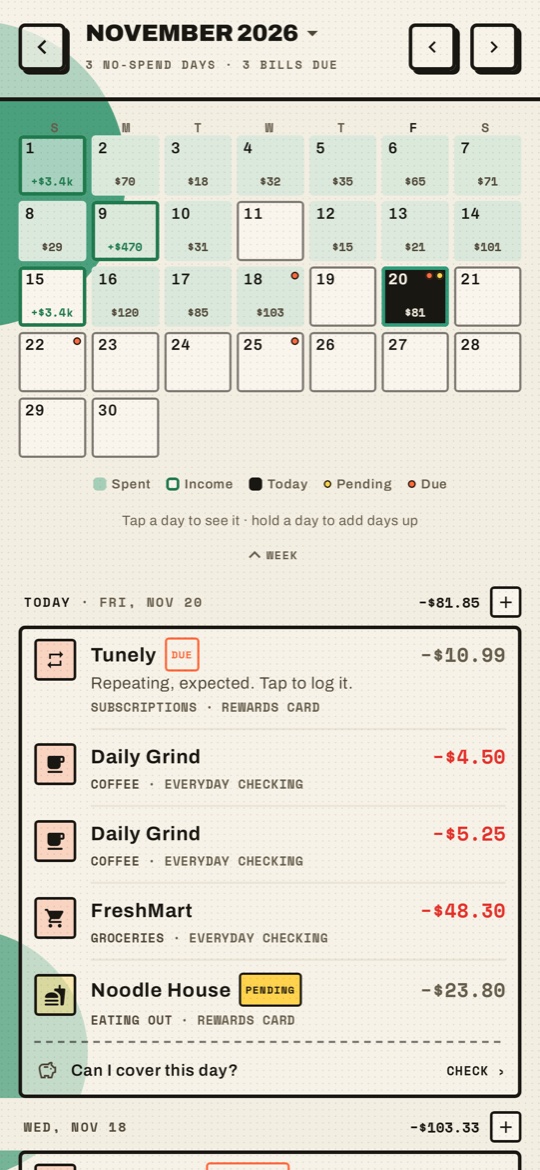
A list of transactions tells you what happened. A money calendar tells you when, which is what you need the week before rent. Centli paints each day with what you spent, what came in and what is due, and lets you ask "Can I cover this day?" before the day arrives.
How the calendar works
Every entry you log has a date, so the calendar fills itself in as you go. Each day in the month grid shows its totals: what you spent, what came in, or both. Today is marked. Tap a day and the list below jumps to its entries. Swipe or use the arrows to change month, and hold a day, then tap others, to add several days up. At the end of the list, Month in numbers sums up the month: money in, money out, net, and your no-spend days.
The question the calendar is built to answer is "Can I cover this day?" Pick today or a day ahead and Centli takes what is due on it, the pending entries and the bills you have added, and checks it against your account balances as you have entered them. You get a plain yes or a shortfall, before the day arrives.
Pending and repeating bills on the calendar
Pending. Add an expense that has not cleared yet, a cheque or a card payment still processing, as pending. It sits on its day as due until you confirm it, and the Home screen keeps a short list of what is still waiting to be reviewed.
Repeating. Rent, a subscription, a loan payment: Centli keeps the rule for you (weekly, every two weeks, monthly, nine frequencies in all) and shows what is coming. Each month you add that month's entries in one tap, "Add this month", so nothing is booked without you seeing it. Once added, they sit on the calendar on their day. Centli also reminds you the day before a bill is due and again on the day (on iPhone, from version 1.5.2).
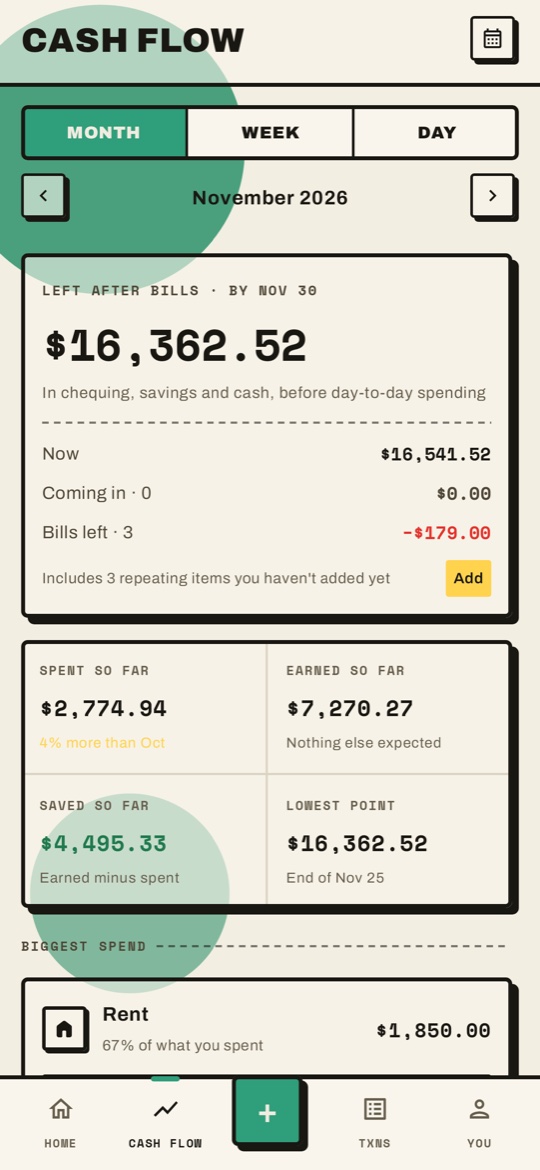
Cash flow for the month
Next to the calendar sits the cash flow view. It shows spent against earned by month, week or day, what is left after bills once the bills you have added are taken out, the lowest point of the month, and a six-month line so you can see the shape of your habits. The "Can I afford it?" sheet takes an amount and shows what the month looks like with it in.
Budgets live one tab over. Ledgers are your categories, each can have a monthly budget, and Centli gives you a heads-up at 80% and again at 100%. A loan ledger shows what you still owe and goes down with each payment.
Why it is all typed in by you
Centli has no bank login. Every entry on the calendar is one you put there, which is slower than a bank feed by a few seconds and better at making you notice. Everything is saved on your phone the moment you tap Save and works offline; here is what that means in practice. If you need to catch up after a busy week, Pro can read a screenshot of your banking app or a PDF statement and prepare the entries for you to review and add.
Questions people ask
Does the calendar need the internet?
No. The calendar is drawn from what you have entered, and that lives on your phone. Only the Pro features that use the cloud, sync and the AI, need a connection.
Can it pull my bills from the bank?
No, and it will not ask for your bank password. You add the bills once as repeating rules, then add each month's entries in one tap.
Does it show income too?
Yes. Income shows on its day with a plus sign, and the month's income total sits under the grid.
Is the calendar free?
Yes. The calendar, cash flow, budgets, loans and accounts are all in the Free plan, with unlimited entries. Pro adds the AI, Share to Centli, cloud sync and watermark-free PDF reports.
See the week before rent coming.
The calendar, cash flow and budgets are free. It starts with one entry.